Chat Window
|
In the interests of sharing insights (and insults) between 2KNet players,
there is a vehicle for online communication built into the program. The
Chat function is available through the Windows menu. When this command is
selected, the Chat window appears.
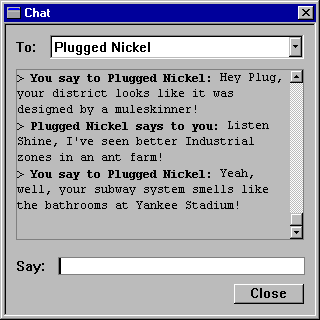
The Chat window is a stand-alone window that you can leave visible somewhere
onscreen or just bring up when the inspiration strikes you. Messages will
be stored in a buffer, so you will be able to scroll through previous exchanges,
just in case you want to save lawsuit material, or quote a line at the next
meeting of the city commissioners.
If you want to send a message to another player, here's the process:
- Choose the Chat command in the Windows menu.
- Select a recipient from the drop-down menu.
- Type your message in the Say box.
- Hit the Enter key.
If the other player has the Chat window open, they will soon see your handiwork
onscreen. If their window isn't open, it will automatically be brought onscreen
when the message arrives. If you've been away from your screen, or need
to review your messages, just bring up the window and use the scroll bar
to survey your statements.
You can also broadcast messages to all players by selecting Everyone in
the To: menu. If your target doesn't happen to be logged on at the moment,
they should receive your messages when they re-enter the game.
|
(C)1996, Maxis, Inc.
|