The Budget Window
Ordinances
Bonds
Police Department
Fire Department
Hospital
Education
Transportation
The Totals
|
The Budget window reports and lets you adjust your city's budget. It automatically
opens every January, unless Auto-Budget (in the Options menu) is selected.
It can also be opened manually by selecting Budget in the Windows menu.
In 2KNet, your budget is your district's budget--other players have their
own budgets. When this page discusses your "city's" budget, it
is addressing the particulars of your district.
You can close the Budget window by clicking on the Done button or in the
Close box at the window's top-right.
The upper-left corner of the Budget window displays your city's name and
the the current year and month.
The Numbers
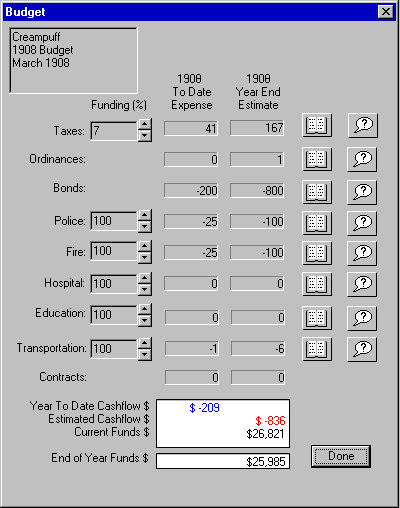
The Budget window has nine rows of figures that cover all the city's revenues
and expenses. Below those figures is a summary of the current financial
situation and an estimate of what your finances will be at the end of the
year.
Each revenue or expense has:
- The name of the revenue or expense.
- A percentage setting (in most cases) where you set either the tax
rate you are charging or the amount of funding you are allotting.
- A year-to-date figure showing the up-to-the-moment amount that you've
spent or made.
- An annual estimate of what you will have spent or made at the end
of the year at the current budget settings.
- Detailed books showing a monthly breakdown of the revenue or expense.
In some cases the book dialog just shows information, but some of the books
also allow access to other, more detailed budgeting functions.
- An advisor who reports current status and/or gives suggestions about
what you should do.
Note: When the Budget window opens automatically at the beginning
of a new year, the Year-to-Date column shows the total for the year that
just ended and the Annual Estimate column shows estimated costs for the
year that is just beginning.
Below is a detailed explanation of each budget item.
Property Taxes
Property taxes are your main source of cash for maintaining and expanding
your city. You can set the overall tax rate for all zones by clicking on
the up- and down-arrows. The minimum tax is 0%, the maximum is 20%. Any
taxes you set here will be equally applied to all zones. You can independently
set the tax rates for residential, commercial and industrial zones in the
Property Taxes Books.
Clicking on the Books icon displays a detailed report of the year's past
and projected tax income. For each month, the following information is given:
- The residential zone tax rate and tax amount
- The commercial zone tax rate and tax amount
- The industrial zone tax rate and tax amount
- A running total of the taxes that will come due at the end of the
year
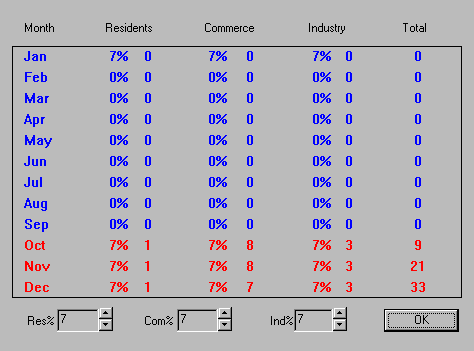
At the bottom of the dialog box, you can set individual tax rates for the
three types of zones. If you change the tax rates here, the overall rate
as shown in the Budget window will display the average of the three rates.
Click on OK to close the Property Taxes books.
Ordinances
This line item is a summary of the costs and revenues of all combined city
ordinances. These range from education drives to sales taxes to neighborhood
watch to an annual carnival.
You will be given a chance to vote with your fellow city commissioners on
the establishing and approval of ordinances that affect the whole map. These
programs are established in the Ordinance window,
which can opened through the Windows menu. Clicking on the Ordinances books
icon will display the specifics of existing ordinances and their fiscal
impact.
Bonds
This line reflects the interest you pay on bond issues.
If you need cash above and beyond the money you make from property taxes,
you can issue municipal bonds, which are basically loans from your citizens.
All bonds are issued for $10,000. The interest you pay on outstanding bonds
is prime rate plus 1%, plus an additional percentage based on your city's
current value and loan rating.
Clicking on the Bonds book icon opens a dialog box with detailed information
and buttons for extra financial transactions.
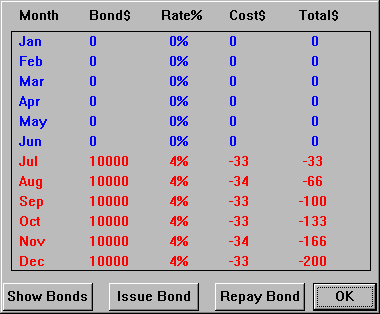
For each month of the year, the following information is given: (actual
amounts are shown in blue, projected amounts are shown in red.)
- The bonds you have outstanding
- The average interest rate you pay on the bonds
- The monthly amount of interest you pay on the bonds
- The accumulated total interest paid
Show Bonds displays:
- Your district's current loan rating
- The total number of bonds you have outstanding
- The current interest rate the bank is paying on your account
- The interest rate you will pay on a bond if you issue it now
- The current value of your district (the infrastructure)
Loan ratings range from AAA to F. Your rating is based on your city value.
The higher your rating, the more bonds you can issue and the lower the interest
rate you pay on them.
Issue Bond opens a dialog that tells you the current interest rate for bonds
and asks you if you want to issue one. All bonds are $10,000. If you need
or want more than $10,000, then you can issue two bonds. If you need or
want less, too bad--take the $10,000 and keep what you don't spend in the
bank. If your loan rating or city value is too low, you won't be allowed
to issue any more bonds.
Repay Bond opens a dialog that tells you the interest rate on the oldest
outstanding bond, and asks if you want to repay it. Bonds are always repaid
from the oldest to the newest. During the life of the bond, interest accrues
monthly, and is paid out at the end of each year from your city funds.
You will pay the interest every year until you repay the bond, so once you're
flush with cash, pay them off and get out of debt.
Clicking on OK closes the books.
Police
This is the cost and funding level for police departments in your city.
You can set the percentage of funding for your departments by clicking on
the up- and down-arrows. In general, try to keep police funding as high
as possible to prevent rampant crime. Any funding you set will be equally
distributed to all police departments. Complete funding for a police station
is $100 per year.
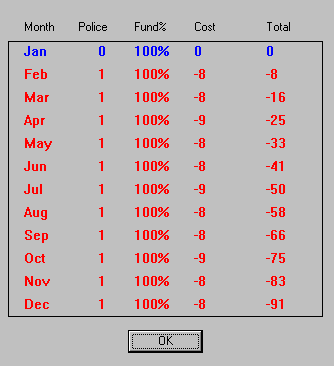
Clicking on the Books icon displays a detailed report of the year's past
and projected police funding costs. For each month, the following information
is given:
- The number of police stations in the city
- The funding level you have set
- The actual monthly cost to fund your stations
- A running total of the yearly cost
There are no additional buttons or functions here, so just click on the
OK button to close the books.
Fire Department
This is the cost and funding level for fire departments in your city. You
can set the percentage of funding for your departments by clicking on the
up- and down-arrows. In general, try to keep fire funding as high as possible
for both preventing fires and responding to emergencies. Any funding you
set will be equally distributed to all fire departments. A fully funded
fire station costs $100 per year.
Clicking on the Books icon displays a detailed report of the year's past
and projected fire funding costs. For each month, the following information
is given:
- The number of fire stations in the city
- The funding level you have set
- The actual monthly cost to fund your stations
- A running total of the yearly cost
There are no additional buttons or functions here, so just click on the
OK button to close the books.
Hospital
This is the cost and funding level for medical services in your city. You
can set the percentage of funding for your hospitals by clicking on the
up- and down-arrows. In general, try to keep funding as high as possible
to keep your Sims healthy. If you keep your funding at 100% for several
decades, the average life expectancy in your city will increase. Any funding
you set will be equally distributed to all hospitals. Complete funding for
a hospital is $75 per year.
Clicking on the Books icon displays a detailed report of the year's past
and projected medical funding costs. For each month, the following information
is given:
- The number of hospitals in the city
- The funding level you have set
- The actual monthly cost to fund your hospitals
- A running total of the yearly cost
There are no additional buttons or functions here, so just click on the
OK button to close the books.
Education
This is the cost and funding level for education in your city. This funding
supports both schools for the children and colleges for higher learning.
Without schools, education in your city will be entirely based on verbal
lore, and you will be unable to support high-technology industries.
You can set the percentage of funding for education by clicking on the up-
and down-arrows. Any funding you set here will be equally distributed to
all schools and colleges. You can independently set the funding rates for
schools and colleges in the Education books. Complete funding for a school
costs $25 per year, and a college costs $100 per year.
Clicking on the Books icon displays a detailed report of the year's past
and projected education funding. For each month, the following information
is given:
- The number of schools in the city
- The funding level for schools
- The monthly cost to fund schools
- The number of colleges in the city
- The funding level for colleges
- The monthly cost to fund colleges
- A running total of the yearly cost
At the bottom of the dialog box, you can set individual funding levels for
schools and colleges. If you change the funding levels here, the overall
level as shown in the Budget window will display the average of school and
college funding levels.
Click on OK to close the Education books.
Transportation
This is the cost and funding level for maintaining the transportation system
in your city. This funding maintains roads, rails, highways, subways, bridges
and tunnels. Without proper funding, your transit systems will deteriorate
and commuting and commerce in your city will fall to pieces.
You can set the overall percentage of funding for your transportation systems
by clicking on the up- and down-arrows. Any funding you set here will be
equally distributed to all types of transportation. You can independently
set the funding rates for roads, rails, highways, subways, bridges and tunnels
in the Transit Authority Books. Complete transit authority funding per year
is: Roads $1 per 10 tiles; Rails $1 per 5 tiles; Highways $1 per section
(4 tiles); Subways $2 per 5 tiles; Bridges $2 per 5 tiles; Tunnels $2 per
5 tiles.
Clicking on the Books icon displays a detailed report of the year's past
and projected transit authority funding. For each month, the following information
is given:
- The cost of road maintenance
- The cost of rail maintenance
- The cost of highway maintenance
- The cost of subway maintenance
- The cost of bridge maintenance
- The cost of tunnel maintenance
- A running total of all transit costs
At the bottom of the dialog box, you can set individual funding levels for
roads, rails, highways, subways, bridges and tunnels. If you change the
funding levels here, the overall level as shown in the Budget window will
display the average of all these funding levels.
Click on OK to close the Transit Authority Books.
Don't forget that anytime you're in a fix about funding for these various
Budget window boondoggles, or if you need to hear the voice of the people
regarding specific district needs, you can always click on the question
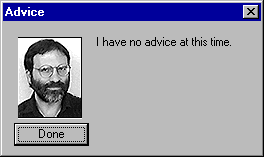
mark button next to the Books button for any category. If there's any advice
to be given, you'll see it there in the Advice window.
Contracts
This item displays the fiscal impact of any contracts you have entered into
with your fellow players. See the Contracts page
for details.
The Totals
The bottom of the Budget window shows the totals for:
- Year-to-Date Cashflow
- Estimated Annual Cashflow
- Current Funds
- (Estimated) End of Year Funds
|
(C)1996, Maxis, Inc.
|