Inside the Simulation
The Effect of Time
Scenarios
Zones
Commerce
Industry
Power
Transportation
Ports
Trees
Water
Recreational Facilities
The Climate
Pollution
Rewards
Education
City Services
Newspapers
Inventions
Speed Issues
|
Easy, Medium and Hard Games
Whenever a new city is begun, the host (server) player has the choice of
three difficulty levels, easy, medium and hard. The differences between
the levels are:
The amount of money you start with. In an easy game, you start with
$30,000. A medium game gives you $20,000. In a hard game, you start $10,000
in debt, with a bond issue to pay back when you can and interest to pay
every year.
The national financial model. Your city is located some where in
SimNation. The growth of your city depends on its surroundings: rich, financially
healthy neighbors are good customers for your industrial products and, bring
their money with them when they visit your tourist attractions. In easy
games, SimNation is in a boom cycle. In medium games, the national economy
is stable. For hard games, SimNation is in a recession.
The external industrial product demand. The easier the game, the
more demand for the products that your city's industries can produce.
The propensity for disaster. The harder the game, the more likely
is it that your city will be host to a disaster. Choosing Disable in the
Disasters menu prevents disasters at all difficulty levels.
The Effect of Time
When you start a new city, you can choose between 1900, 1950, 2000 and 2050
for its founding year. And as time goes by, things change, including:
The available technology. The technology levels in 2KNet roughly
follow reality, give or take a few years. (Except for the future stuff,
which is just guessing, so don't come to us in 2050 and complain that we
don't have fusion power yet.) Inventions that give you access to new technology
are announced in newspaper headlines.
The national financial model. Since the national and world population
is larger now than it was in 1900, there are more potential citizens and
more potential customers. External demand increases with time. It is easier
to build a bigger city in 2000 than it is in 1900.
The per capita (per zone) power consumption. In 1900 there aren't
many ways for the average citizen to squander energy. Then, starting around
1930, with the advent of muscle cars and electric-powered everything and
lots of electronic toys, power consumption zooms, peaking around 1970. From
1970 to 2000, because of both conservation practices and more efficient
gadgetry, per capita power use sinks and levels off. This energy effect
in SimCity 2000 is subtle, but can be affected by passing the energy conservation
ordinance in the Ordinance window.
Scenarios
2KNet scenarios are special cities with problems or interesting situations,
included both to provide a number of gaming challenges and to help you better
design your own cities by seeing the mistakes and problems other cities
have faced.
Scenario cities are all in separate files, and are read into the game when
you load them from the Load dialog. Additional scenarios can be added later.
Each Scenario includes:
- A pre-built terrain
- A problem to create and solve
Creating the problem is your decision based on the Scenario you chose. Most Scenarios will have an interesting map, creating difficulties for either player cooperation or competition.
There won't be any particular fanfare if you win--it's
an intellectual pleasure, you know.
Typical "goals" include:
- Reaching a population level
- Reaching a financial goal
- Rebuilding your industry
- Reducing crime, pollution or traffic
Zones
One of your primary functions as city planner is zoning--deciding what types
of buildings go where. Good zoning allows all city functions to be accessed
by all citizens, and sets the feel and flow of life in the city. All zones
in 2KNet can be decreed to be either light-density (low population) or dense
(high population).
As you zone areas, the empty zones are shown in colors so you can easily
keep track of them. You can turn on and off the display of empty zones in
the underground view with the Show Zones button in the City toolbar.
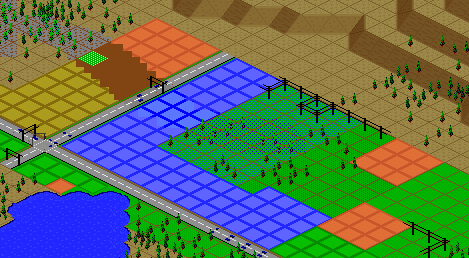 Peekin' at Zones by Way of the Show Zones Button
There are three basic zones in 2KNet: residential, commercial and industrial.
- Residential zones, shown in green, are places where Sims live. They
include everything from luxury homes to slums.
- Commercial zones, shown in blue, are the shops, stores and offices
of the city.
- Industrial zones, shown in yellow, are the factories and manufacturing
centers of the city.
Zones can be almost any shape or size that can be made out of squares or
rectangles. If you zone over an area that is already zoned, you will be
charged for rezoning only if you change the type of zone or the density.
You won't be charged for zoning light residential over an existing light
residential area, but you will be charged if you zone dense residential
(or light or dense industrial or commercial) over light residential.
To remove zoning from an area without rezoning, use the De-zone function
of the Bulldozer tool in the City-building toolbar.
Sims only build in zoned areas. You, as commissioner, can build elements
of the city infrastructure (roads, rails, power lines, power plants, etc.),
city services (police and fire stations, etc.) and other public places (parks,
zoos, museums, libraries, schools, etc.) either in zoned or unzoned areas.
Zones grow and decay as Sims move in and out of individual buildings, zones
or the city. Depending on the times, the economy and your design skills,
booming, bustling zones may be abandoned, or empty zones may suddenly become
prime real estate and suddenly grow into a city center.
Specialized Zones
Seaports and airports are actually special-purpose zones. They are placed
and sized like the basic (residential, commercial and industrial) zones
and they needn't be placed in existing zones.
Roads, rails, stations, depots, and city-owned buildings like power plants
and police stations don't need to be placed in zones. In fact, when you
place them in a zone, they de-zone that land. For example, if you place
a road across a zone, then remove it with a bulldozer, the newly exposed
land will be unzoned. You can save a lot of zoning money by leaving spaces
between them for roads and rails and keeping your power plants, stations,
depots and departments out of zoned areas.
Commerce
Commerce is primarily trade within your city. It is slow in a small city,
since your internal market is small. Commerce remains a much less important
aspect of a city until it reaches a population of about 100,000, where income
from commerce catches up with industry. As your population grows beyond
that, your city may become primarily a commercial center. It will become
more and more independent, relying less and less on the external market,
but you'll always need at least some industry for a well-balanced city.
Commercial zones develop better and faster near the city center. Airports
provide a big boost to your city's commerce once your city reaches a population
of at least 20,000.
Industry
Industry is the manufacture of goods and services to sell. You can sell
both to the internal market
(within your city) and the external market (outside your city).
Industry is the lifeblood of a small city, and is much more important than
commerce while your population is small. When a city is small, there aren't
enough customers in it to support itself. You have to manufacture things
to sell to the external market and bring in more cash and people. In fact,
industry can be thought of as the reason to start a new city.
Industry is a primary source of employment in your city. It is also the
primary source of pollution. Industrial areas tend towards low land value
and high crime.
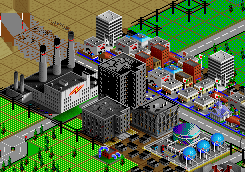 A Simple Industrial Zone
The Industry window is an important tool if you
want to control the direction of industry in your city. It gives you a readout
of the current distribution of industries in your city, as well as the external
demand for the products of the various industries. It also lets you set
different tax levels for different industries to encourage the ones you
want and discourage those you don't. You may want to discourage an industry
that causes a lot of pollution. You may want to encourage a small industry
that you think may be about to boom.
When you create an industrial zone, the Sims tend to build the industries
that are in highest demand. The demand for different industries is related
to the era. For example, in 1960, the electronics industry isn't nearly
as important, or in as much demand as in 1990.
A forward-thinking commissioner in 1930 just may believe that there is a
big future in that upstart, tiny electronics industry. Since it is in low
demand, the Sims won't invest in it--unless their commissioner gives them
a tax incentive. So the commissioner lowers the tax on the electronics industry
and it begins to grow. Thirty years later it begins to bloom, then boom.
That's when the commissioner raises the taxes and makes a fortune for the
district--while securing lots of jobs in a high-tech, still-growing industry.
Another forward-thinking commissioner whose district is almost entirely
supported by one industry, say automotive, may want to diversify before
the market crashes and the city becomes a ghost town.
And yet another forward-thinking commissioner may realize that the new high-tech
industries won't thrive without an educated population, and will make sure
to provide schools, colleges and other educational institutions.
Many aspects of city design affect industry. The presence of hospitals can
give a boost to the petrochemical industry (pharmaceuticals). The presence
or lack of seaports can help or hinder heavy manufacturing like steel, mining,
and auto motive. The presence or lack of a good highway and/or rail system
can also affect heavy industry's development. City ordinances can also hinder
or help various industries.
Power
Yes, cities existed before electricity, but not in 2KNet. Sims are electronic
life-forms and can't exist without it.
All zones need power to develop. Power lines transfer power between power
plants and zones and between non-adjacent zones. Power isn't transferred
through adjacent zones or through roads or rails that divide zones without
power lines.
Tiles with power lines consume power. If you place too many power lines
you waste a lot of power.
The types of power sources available are time-dependent. You can't build
a nuclear power plant in 1900. As new technology becomes available, it will
be announced in the newspapers. All power plants are introduced when they
become cost-efficient--no early, flaky experimental models in this game.
Some of 2KNet's power sources do not yet exist in the real world. We've
made some rough predictions as to when they'll be available and put them
into the game. If our predictions are off, sorry--we specialize in simulation,
not real stuff. You can mix and match the types of power plants in a single
city.
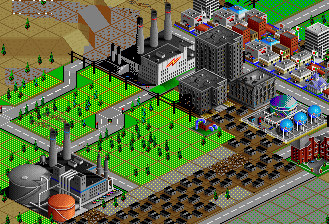 Power Plants, Oil and Coal
All power plants (except for hydroelectric, which can last forever) have
a 50-year life span, after which they collapse. When they collapse, they
don't cause fires or leak radiation, they just stop working, and you have
to rebuild them (and pay for them all over again). The Query tool will give
your plants' exact ages.
If you have the No Disasters setting activated (in the Disasters menu),
then plants won't collapse. They'll be automatically rebuilt and you'll
be charged. If you don't have the cash to rebuild them, then they'll collapse
and you'll be out of power and out of luck. So save up cash for power plant
replacement or be ready to issue a bond.
Power is measured in megawatts (Mw). Developed areas require on the average
one Mw for three occupied tiles. The exact power consumption varies with
time, population density and an occasional city ordinance. Connecting too
many buildings to a power source results in brownouts.
Here is a table comparing the different power plants. The years are +/-
10 years.
| Type | Year
Available | Mw | Cost
| Cost per Mw |
|---|
| Coal | 1900 |
200 | $4,000 | $20 |
| Hydroelectric | 1900 | 20
| $400 | $20 | | Oil | 1900 | 220
| $6,600 | $30 | | Gas | 1950 | 50
| $2,000 | $40 | | Nuclear | 1955 | 500
| $15,000 | $30 | | Wind | 1980 | 4
| $100 | $25 | | Solar | 1990 | 50
| $1,300 | $26 | | Microwave | 2020 | 1600
| $28,000 | $17.5 | | Fusion | 2050 | 2500
| $40,000 | $16 |
Coal power is always available, even in 1900, and is fairly efficient, but
is the worst polluter.
Hydroelectric power is always available, even in 1900, is fairly efficient,
and doesn't pollute. Hydroelectric dams can only be placed on falling water.
Oil power is always available, even in 1900, and pollutes about half as
much as coal.
Gas power pollutes even less than oil, but is very inefficient.
Nuclear power is expensive to build and not too efficient, but it puts out
a lot of power. Nuclear power plants are unavailable if you declare your
city a nuclear-free zone.
Wind power is fairly efficient and very clean, but puts out very little
power, so you'll need a lot of wind generators to produce serious wattage.
Wind power is also subject to the whims of the weather. There is more wind
at higher altitudes.
Solar power is non-polluting and fairly efficient, but has a low output
and is unreliable--very little power is produced when it's cloudy or foggy.
A combination of solar and wind power plants can produce a stable energy
flow since one generally thrives while the other snoozes.
Microwave power is actually solar power collected by an orbiting satellite
and beamed down to a microwave collector disk. It is very efficient and
produces a massive amount of power, but is very expensive to "get off
the ground."
Fusion power is very clean and reliable. It is the most efficient power
source and produces enough power to run a city half the size of your entire
city limits. It is very safe, with no radiation leakage or meltdowns. But
it costs a whole heck of a lot of money.
Transportation
People gotta move. Sims gotta move. Products, delivery trucks, construction
materials and all kinds of things need to be moved around the city. Transportation
is the city's circulation system. Sims won't start developing a zone or
building any buildings until there is access to some sort of transportation
system.
It not only costs money to build your transportation system, but there is
a yearly maintenance fee, found in the Budget window. By examining the Transit
Authority books, you can set separate funding levels for roads, highways,
rails, subways, bridges and tunnels.
The most basic transportation system consists of roads. Sims won't build
buildings that are more than three tiles from a road (or other transportation
system), so if you're after density, the largest area that will fully develop
is a 6 x 6 square surrounded by road. If you're more interested in aesthetics,
then you can make larger squares or rectangles and put parks or forests
in the undeveloped center.
Tunnels allow roads to run through mountains instead of going around them.
They can be a real convenience, but they can also be expensive. They cost
more to build than roads, and their yearly maintenance is higher. Tunnels
can't cross each other, even at different altitudes.
When roads carry up to 44 cars per minute, it is considered to be "no
traffic." From 44 to 88 cars per minute is light traffic, and above
that is heavy traffic. Watch the newspapers for traffic-related stories
and check the traffic map in the City
Info window to find trouble spots. In addition to causing traffic, roads
or the cars on them are a major source of pollution in your city.
Once your roads are overloaded, you have a number of options, depending
on the year in your city. In 1900, your only transportation options are
roads, tunnels, rails and rail depots. Other options become available as
new technologies develop. Watch the newspapers for inventions that give
you access to new forms of transportation.
These are the years, +/-10 years, when different forms of transportation
become available:
| 1910 | Subways and subway stations
|
| 1920 | Buses and bus depots
|
| 1930 | Highways and onramps
|
Buses allow roads to carry more people than roads alone without generating
problem traffic. To start a bus line, you need at least one bus depot. Buses
leave the depot and let passengers on and off all along the way. There are
no animated buses, so the visible effect of a bus depot is a lowering of
traffic near the depot. Bus depots must be adjacent to roads. If they are
adjacent to onramps or highways but not a road, they won't be effective.
Buses are a more efficient use of gasoline than cars, so they produce much
less pollution per passenger. Pollution levels are slightly but noticeably
lower around effective bus depots.
Highways are basically two roads, one in each direction, so they are capable
of carrying twice as many cars as a road. In addition, because they can
travel at a higher speed on a highway, Sims will commute farther on a highway
than on a road--up to three times as far. You must provide onramps everywhere
you want to let Sims enter or exit the highway. Sims can't travel back and
forth between zones and onramps without roads. A highway system is an extension
of a road system, not a replacement.
Rails are the paths your trains follow. Sims can only get on or off trains
at rail depots. Depots must be adjacent to rails, and you need at least
two for a working rail line. Rails can carry many more commuters than roads,
plus they are a big boost to heavy industry, allowing shipping of goods
and raw materials around the city. Since trains go faster than cars on city
streets, Sims will commute farther by train than by car. Compared with cars,
trains produce almost no pollution.
Subways are underground rail systems, but are primarily for passengers,
and less for the shipping of goods and raw materials. They can be connected
directly to rail lines for a continuous flow of train cars. Passengers can
only get on and off subways at subway stations. The advantage of subways
over other transportation systems is that they are mostly underground. They
don't take up valuable real estate. And if you want to add rails to an already
developed city, you'll have to tear down a lot of buildings for the rails
themselves as well as the large depots. Subways only require small (1 tile)
access ways above ground, so they can be added to a city without calling
in the wrecking crew. The disadvantage of a subway system is that it's very
expensive to build and maintain. Subways produce almost no pollution.
When simulating traffic, 2KNet doesn't really simulate every Sim in your
city going to work and back and to the store and back and to school and
back and to the pub and back and everywhere else they go. With thousands
or millions of citizens this would take forever to simulate. The way the
traffic model works is a process called "trip generation" and
works on a building-by-building basis. It also works on the assumption that
most trips will be from one type of zone to another.
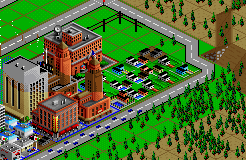 Sims Cruising by the Fire Department
For each building in each zone, the simulator generates trips to both of
the other types of zones. If the starting building is a house in a residential
zone, the simulation will search out a path to a commercial zone and back,
and to an industrial zone and back. It tries to avoid heavy traffic areas,
and if it bumps into mass transit, there is a 50/50 chance it will take
it.
There is a time limit for each trip, and if the time runs out before reaching
a zone, then the trip is a failure. The time limit is stable, but the allowable
distance to the destination depends on the mode of transport. Since highways,
rails and subways travel faster than cars on regular roads, the simulation
can go up to three times as far while looking for a destination zone.
If a failed trip involves mass transit, then the next time that same building
is checked, it won't even try that same type of mass transit.
So the amount of traffic alleviated by mass transit depends on two things:
- The whims of the Sims--that 50/50 chance.
- Your city's design: if the bus or train won't get the Sims where they
want to go, they'll drive.
A bad mass transit system is worse than none at all, because it won't get
used. To promote the use of mass transit as much as possible:
- Put bus or rail depots or subway stations near busy intersections.
- Make sure that mass transit lines travel through different types of
zones. A bus line that stays in a residential zone won't have much business.
Ports
Airports and seaports are specialized zones. Placing them in areas that
are already zoned is a waste
of your funds. An airport's primary effect is to boost commerce. Seaports
boost industry. Neither type of port is necessary (or affordable) in a very
small city.
Once your city starts to grow, your citiSims will let you know when they
want ports. The bigger the city, the bigger the ports it will require. Since
you can make ports any size you want, and they're very expensive, start
small--but leave open space for later expansion. When the city outgrows
your small ports, the Sims will let you know when it's time to expand. But
if you notice your commercial or industrial zones' growth rate slowing down,
you may want to add ports before your Sims ask for them.
Both types of ports produce pollution, but airports pollute more.
Trees
Trees and forests add beauty to your city and its surroundings, and improve
property values. They are flammable and can help fires spread.
Water
Lakes, rivers and oceans are sources of drinking water for your city. They
also provide recreational areas and tourist attractions, and improve land
value.
You can add as much water to your city as you want, but it is very expensive,
so plan ahead.
Seaports must be on a river or the ocean to be effective, and marinas in
the desert are no fun at all.
The Water System
You can build a city without any water system at all, but the population
won't grow very dense. A basic water system consists of pumps and pipes.
When Sims build buildings, they put in the underground plumbing. All you
have to do is add the water mains to connect the buildings to the system
and supply the water.
Parts of the water system that are properly supplied with water are animated
in light and dark blue. Areas that aren't animated either aren't hooked
up or your water source is too small for the population.
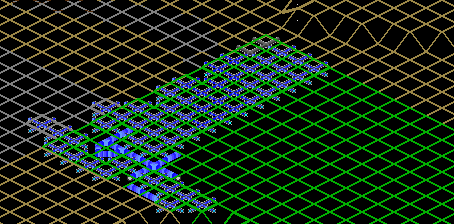 Water Movement in Underground Pipes
Water pumps, when placed away from fresh water act as wells. The amount
of water they provide depends on your city's water table and the season.
Water pumps placed right next to fresh water (lakes or streams) produce
about three times as much as a well on dry land. A pump placed next to salt
water (coastline) acts just like a well away from water. To get drinking
water from a coastline you need a desalinization plant, which is expensive,
but sometimes necessary. Desalinization plants produce twice as much water
as a water pump near a river.
Since the amount of water varies with the season, you may end up with shortages
during the dry months. Water tanks store water during the wet season so
you don't run low in dry times. Another way to prevent droughts is to build
a treatment plant to clean and recycle your water.
Recreational Facilities and Open Spaces
Open spaces, whether they are undeveloped greenbelts or manicured recreational
facilities, are important to a city, both aesthetically and psychologically.
Besides adding land value, trees, forests and open space give a city a better
feel, an openness that makes citizens feel comfortable and encourages new
residents.
As your population rises, your Sims will start demanding recreational facilities.
The developed recreation facilities that are available in 2KNet are small
parks, big parks, zoos, stadiums and marinas. Recreational facilities are
primarily for your city's residents, increasing land value and promoting
residential zone growth, but they also influence tourism. Small parks increase
land value about the same amount as trees, and big parks increase it twice
as much. Marinas, zoos and stadiums are a big boost for residential growth.
The Climate
Even though you don't see the seasons change or the rains fall, and you
don't feel the wind blow (other than an occasional tornado or hurricane),
there is a climate model in 2KNet that affects your city.
Weather trends are generated on a monthly basis, when the simulation looks
at the current trend and the season and throws in a certain weighted random
element and decides the next trend. The different trends are: cold, clear,
hot, foggy, chilly, overcast, snowy, rainy, windy, blizzard, hurricane and
tornado. Blizzard, hurricane and tornado are the least likely to occur.
Each trend has a temperature, a wind and a humidity element. In general,
temperature affects the water supply, the availability of solar power, and
the likelihood of fires and riots; wind affects the availability of wind
power, and humidity affects the water supply. These effects combine in various
ways in the various trends.
Pollution
Pollution as shown in the maps and graphs is a general overall level combining
air, water and noise pollution. The biggest polluters in your city are automobiles,
then industry and some types of power plants.
The main things you can do to keep pollution down in your city are to provide
good mass transit, opt for low- or non-polluting power sources, and promote
low- and non-polluting industries through tax incentives.
Rewards
So you're a great commissioner. So you build a great city with the power
of your mind and the sweat of your mouse-finger. So your citiSims love you.
So what? Where are the perks?
That's where the rewards come in. For the most part the rewards are more
for the city than for you personally. Some say that the art and the artist
are one, so a reward for your city--your creation--is a reward for you.
Others say, "Give me the cash." In any event, there are at least
a couple rewards that should give your ego a boost.
Rewards are based on population. As you reach various population levels,
you will be notified that a reward is available in a newspaper article and
the offering will appear in the submenu under the Rewards button in the
City toolbar.
At Population |
You Get |
|---|
2,000 |
A Commissioner's house |
10,000 |
City Hall |
30,000 |
Something cool that will boost your ego |
As your city grows, there will be other things that you'll just have
to find out for yourself, because I won't tell you. Well, OK. I'll tell
you one more: Arcologies at a population of 120,000.
Arcologies are huge, tall, dense cities-in-a-building. They are like a very
dense combination residential, commercial and industrial zone. Arcologies
are a way to help your population zoom from mere hundreds of thousands to
millions, expanding your tax base. There are four different arcologies,
designed in 2000, 2050, 2100 and 2150. Even if you have a huge population,
you can't build an arcology until it's ready.
Arcologies also spur the growth of nearby residential, commercial and industrial
zones. Even though they are theoretically totally contained cities, people
who live inside will come out to shop and see the sights, and may even work
outside. Others may live outside and work inside.
They look cool too. Unfortunately, arcologies have all the problems of an
extremely dense city: lots of crime, pollution and traffic. Technically,
arcologies have their own internal police force and traffic system, but
there is always an overspill of criminals, travelers and fun-seekers. Make
sure you have police coverage near arcologies and that there is ample public
transportation surrounding them.
Education
Education in 2KNet is expressed as an Educational Quotient, or EQ. The higher
the EQ, the more educated your population is. You can see a readout of your
citiSims' EQ in the population window. EQs range from zero (brain dead)
to 150. The equivalent of a high school education is an EQ of 90.
A four-year college degree is an EQ of about 140. The SimNational average
EQ is 100.
A high EQ is a source of pride to your citizens. It makes your city a more
attractive place to raise their children. It also attracts high-tech industry.
A low EQ is a source of embarrassment and causes insulting stories to appear
in your local (and unread) newspaper. A city with a low EQ has a higher
likelihood of both unemployment and rioting.
When you start a new city, the Sims who move in and start their new lives
are at least somewhat educated, so you don't have to build schools right
away. But don't wait too long, or your settlers' children will be ignorant.
If you have no schools or colleges, then education consists solely of verbal
lore passed down from generation to generation, and children will only achieve
about 20% of their parents' EQ.
Schools each service a population up to about 15,000, depending on the age
distribution of your citizens. Enough schools with full funding can increase
your city's EQ up to 90 over a period of time.
Colleges each service a population of up to 50,000, and can eventually increase
your city's EQ to as much as 140, but only if you have enough well-funded
schools to prepare students for college.
After Sims graduate high school or college, their EQ will slowly erode.
The presence of libraries and museums stops this erosion.
All educational facilities raise the local land value, and require yearly
funding in the Budget window to remain effective.
City Services
City services consist of police and fire protection, hospitals and prisons.
All city services require
yearly funding in the Budget window to be fully effective. The locations
and effective areas of city services can be seen in the Map window.
Police stations lower the crime rate and raise the land value in a radius
around each station. They have the most effect right near the station, and
less as distance from the station increases. The locations of police stations,
their coverage and the crime rate can be seen in the Map window by choosing
the Crime Rate radio button after clicking on the Crime button. You can
get to the Map window's crime views through the City Info window command
in the Windows menu.
Each police station has a small jail where prisoners are kept. As a city
grows and if crime runs rampant, the small jails will be so full and the
police will be spending so much time taking care of the prisoners that their
efficiency and area of coverage will go down. At this point you can either
build a lot more police stations or build a prison. In 2KNet, prisons raise
the efficiency and effectiveness of your police departments--but only if
there is a lot of crime. Prisons are no help to cities with low crime or
small populations. If and when your prison gets too full, the newspaper
will let you know.
The presence of fire stations makes fires go out sooner, helps prevent fires
from occurring in the first place, and raises land value. They have the
most effect near the station. The locations of fire stations and their coverage
can be seen in the Map window by using the Fire Power and Fire Department
buttons.
Hospitals keep your Sims healthy, fix them when they're broken, and raise
their Life Expectancy (LE). A fully funded hospital can serve a population
of 25,000 Sims. You can see the effect of hospitals on your population's
LE in the Population window. If you don't have a hospital, your city's LE
will slowly decline to about 35. If you have enough fully funded hospitals
the LE will slowly climb to 85. There are also city ordinances (in the Ordinance
window) that can have a positive effect on your city's LE.
Newspapers
Your city's newspaper is your link to your citizens. Reading it keeps you
informed, not only of current events, new inventions, city-development announcements
and other important or disastrous occurrences, but also of public-opinion
polls. Watch your paper closely to see what is important to your Sims.
The newspaper changes periodically, so reading it in full can be time consuming,
but useful. Papers announcing important events--inventions and rewards for
city growth--will appear when the event occurs. Otherwise, you will have
to open the Windows menu and select the Newspaper command. A newspaper announcing
disasters will always appear.
Inventions
As time passes, things are invented. These inventions give you access to
new technologies that you can incorporate into your city. As the technologies
become available, new tools will appear in the submenus under the buttons
in the City toolbars. Inventions are announced in your newspaper.
Here are the inventions and their approximate discovery dates, +/-10 years.
| Subway systems | 1910 |
| Buses and bus depots | 1920
|
| Highways | 1930 |
| Water treatment plants | 1935
|
| Gas power plants | 1950 |
| Nuclear power plants | 1955
|
| Wind power plants | 1980 |
| Solar power plants | 1990 |
| Desalinization plants | 1990
|
| Arcologies | 2000, 2050, 2100, 2150
|
| Microwave power plants | 2020
|
| Fusion power plants | 2050
|
Speed Issues
2KNet is a very complex simulation. It is also in 256 colors. Both these
facts require a lot of computer power. These circumstances are compounded
by all the variables that can occur when data is transferred over a network,
a modem, or the Internet. The actual time it takes for a year to pass in
your city depends on a number of things, including:
- The type of microprocessor in your computer. 2KNet runs on a wide
variety of computers. The more powerful your microprocessor, the faster
time will pass.
- The microprocessor's clock speed. The faster the processor, the faster
the simulation will run.
- The resolution of your screen and the size of your monitor. Depending
on your computer, you may be running 2KNet in as low as 512 x 384 pixel
resolution or as high as 1280 x 1024 or more. The higher the resolution,
the more dots 2KNet has to draw on your screen, and the slower it will go.
Of course the speed of your computer and your graphics card may make up
for lost time.
- The size of your city. The simulation model spends a lot more time
and does a lot more calculations on tiles that are developed than on bare
land tiles. In a busy city that fills the whole city limits, time will pass
much, much slower than in a tiny town. Ways to make the simulation go faster
include:
- The server machine player setting the speed to Cheetah in the Speed
menu.
- Keeping the City window small.
- Keeping as few windows as possible open at a time.
- Turning off Music and Sound Effects (in the Options menu) helps a
little
And, of course, how reliable your data-transmission is over your game's
network setup.
But then again, sometimes you don't want time to pass too fast, especially
when disasters are sweeping through your city or when you are trying to
keep your city center from decaying. In these times of need, you can always
beg the server player to open the Speed menu in the Network Server window
and slow things down, or even stop them entirely.
|
(C)1996, Maxis, Inc.
|